typedef и с чем его едят

typedef int Apple;
typedef int Orange;
Apple coxes;
Orange jaffa;
...
coxes++;
...
if (jaffa == 10)
...
21 July, 2009
typedef


Static
- On the difference between static global and static
Static global has file scope and it can't be accessedoutside of the file. While global has program scope and can be accessed outside of file in which it has been defined using extern keyword. A program can be spread across two or more files... so, a global variable can be accessed by all the files.. where as, a static global variable can be accessed only bythe file in which it is declared...static means permanent and hence the value in static global variable is shared by all the functions in that file...
- Static class variable
#include
using namespace std;
class shared {
static int a;
int b;
public:
void set(int i, int j) {
a=i;
b=j;
}
void show();
} ;
int shared::a;
void shared::show()
{
cout << "This is static a: " <<>
cout << "\nThis is non-static b: " <<>
cout << "\n"; } int main() { shared x, y; x.set(1, 1); x.show(); y.set(2, 2); y.show(); x.show(); return 0; }
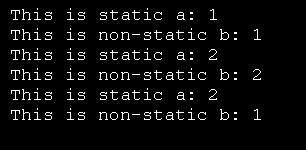

- static variable in a function
#include
int func1(){
static long lfunc=1;
printf("%s : lfunc = %d\n ",__func__,lfunc);
lfunc++;
return 0;
}
int main(){
func1();
func1();
func1();
return 0;
}
Output:
make static && ./static
g++ static.cpp -o static
func1 : lfunc = 1
func1 : lfunc = 2
func1 : lfunc = 3
- Static methods
20 July, 2009
Useful C++ tricks
from http://prokutfaq.byethost15.com
Odd or even?
bool isOdd(int num){
return num&1?true:false;
}
Odd or even?
bool isOdd(int num){
return num&1?true:false;
}
If the number is odd then it's least significant bit (LSB) is set i.e. it is 1. If it is even then it is 0. When you bitwise and (&) this number with 1, the result would be either 1 if the number is odd or zero if it is even.
Passing 2 dimensional array
Example:/* This program demonstrates passing a 2 dimensional array of size 4 * 4 */
void myFunction(int(*)[4]);
int main()
{
int a[4][4];
myFunction(a);
return 0;
}
void myFunction(int (*myArray)[4])
{
/* Here you can access the content of the argument passed like any other 2-D array */
/* Example: myArray[2][2]=10; */
}
void myFunction(int(*)[4]);
int main()
{
int a[4][4];
myFunction(a);
return 0;
}
void myFunction(int (*myArray)[4])
{
/* Here you can access the content of the argument passed like any other 2-D array */
/* Example: myArray[2][2]=10; */
}
Passing 3 dimensional array
Example:/* This program demonstrates passing a 3 dimensional array of size 4 * 4 * 4 */
void myFunction(int(*)[4]);
int main()
{
int a[4][4][4];
myFunction(a);
return 0;
}
void myFunction(int (*myArray)[4][4])
{
/* Here you can access the content of the argument passed like any other 3-D array */
/* Example: myArray[2][2][2]=10; */
}
void myFunction(int(*)[4]);
int main()
{
int a[4][4][4];
myFunction(a);
return 0;
}
void myFunction(int (*myArray)[4][4])
{
/* Here you can access the content of the argument passed like any other 3-D array */
/* Example: myArray[2][2][2]=10; */
}
And an inetresting bit about changing particular bits
22 September, 2008
12 September, 2008
if all else (lsof, fuser) fails
Here is a brute force method to eject a stubborn external drive
% hdiutil eject -force device_name
29 August, 2008
05 August, 2008
Interactive Font Size Adjustment in Emacs. About time.
(defun sacha/increase-font-size ()
 (interactive)
 (set-face-attribute 'default
                     nil
                     :height
                     (ceiling (* 1.10
                                 (face-attribute 'default :height)))))
(defun sacha/decrease-font-size ()
 (interactive)
 (set-face-attribute 'default
                     nil
                     :height
                     (floor (* 0.9
                                 (face-attribute 'default :height)))))
(global-set-key (kbd "C-+") 'sacha/increase-font-size)
(global-set-key (kbd "C--") 'sacha/decrease-font-size)
idx =(a>0) % returns 1 if true, 0 otherwise
A=magic(4) % create a matrix
[r,c,v]=find(A>10) %get indices + vector of elements satisfying the conditions
N=(A>3) % produce matrix with same dimensions as A, with 1 and zeros according to condition
pretty(expression)
%and
latex(expression) % as the names suggest
15 July, 2008
31 May, 2008
About time I posted my new .emacs
(setq inhibit-startup-message t)
;; Moving cursor down at bottom scrolls only a single line, not half page
(setq scroll-step 1)
(setq scroll-conservatively 5)
(global-set-key [delete] 'delete-char)
;; Every file has at least a new line
(setq require-final-newline t)
;;SLIME for lisp
(add-to-list 'load-path "/Users/mifa/lisp/slime-2.0/") ; your SLIME directory
(setq inferior-lisp-program "/usr/local/bin/sbcl") ; your Lisp system
(require 'slime)
(slime-setup)
;;something about bookmarks
(defun hk ()
(insert "(setq-default bookmark-default-file \"bookmarks\")\n"))
;; Make all "yes or no" prompts show "y or n" instead
(fset 'yes-or-no-p 'y-or-n-p)
;; Make scripts executable on Save (saves having to do the chmod every time)
(add-hook 'after-save-hook 'executable-make-buffer-file-executable-if-script-p)
;; set up Time Stamps
(add-hook 'before-save-hook 'time-stamp)
(add-to-list 'load-path "/Users/mifa/.emacs.d/")
(setq search-highlight t)
;; show current function in modeline
(which-func-mode t)
;; .emacs
(if (fboundp 'scroll-bar-mode) (scroll-bar-mode -1))
(if (fboundp 'tool-bar-mode) (tool-bar-mode -1))
(if (fboundp 'menu-bar-mode) (menu-bar-mode -1))
;;(set-fringe-mode 0)
;; Before we start setting colors, we have to tell Emacs to always
;; syntax-hightlight everything to its fullest extent, and don't wait
;; to fontify (do it immediately).
;;
(highlight-changes-mode t)
(highlight-changes-mode t)
(global-font-lock-mode t)
(setq font-lock-maximum-decoration t)
(setq font-lock-maximum-size nil)
(setq font-lock-support-mode 'jit-lock-mode)
(setq jit-lock-stealth-time 0)
;; uncomment this line to disable loading of "default.el" at startup
(setq inhibit-default-init t)
;; Highlight "FIXME" comments
(font-lock-add-keywords
'c++-mode
'(("\\<\\(FIXME\\)" 1 font-lock-warning-face t)))
(modify-face (quote font-lock-warning-face) "Red" "yellow" nil t nil t nil nil)
(font-lock-add-keywords
'c++-mode
'(("\\<\\(NOTE\\)" 1 font-lock-warning-face t)))
(modify-face (quote font-lock-warning-face) "Red" "yellow" nil t nil t nil nil)
(font-lock-add-keywords
'c++-mode
'(("\\<\\(POLARIZED\\)" 1 highlight t)))
(modify-face (quote font-lock-warning-face) "Red" "yellow" nil t nil t nil nil)
(font-lock-add-keywords
'c++-mode
'(("\\<\\(misha\\)" 1 highlight t)))
(modify-face (quote font-lock-warning-face) "Red" "yellow" nil t nil t nil nil)
(font-lock-add-keywords
'c++-mode
'(("\\<\\(UNPOLARIZED\\)" 1 highlight t)))
(modify-face (quote font-lock-warning-face) "Red" "yellow" nil t nil t nil nil)
(font-lock-add-keywords
'perl-mode
'(("\\<\\(FIXME\\)" 1 font-lock-warning-face t)))
(modify-face (quote font-lock-warning-face) "Red" "yellow" nil t nil t nil nil)
(font-lock-add-keywords
'perl-mode
'(("\\<\\(NOTE\\)" 1 font-lock-warning-face t)))
(modify-face (quote font-lock-warning-face) "Red" "yellow" nil t nil t nil nil)
(setq c++-font-lock-extra-types
'(
"TFile"
"TProfile" "TH1D" "TH1F" "TH1"
"Double_t" "Float_t" "Int_t"
) )
(transient-mark-mode t)
(eval-after-load "perl-mode"
'(define-key perl-mode-map "\C-c\C-c" 'comment-region))
;(eval-after-load "python-mode"
; '(define-key python-mode-map "\C-c\C-c" 'comment-region))
(show-paren-mode 1)
;; define function to match a parenthesis otherwise insert a '~'
(defun goto-match-paren (arg)
"Go to the matching parenthesis if on parenthesis otherwise insert '~'."
(interactive "p")
(cond ((looking-at "\\s\(") (forward-list 1) (backward-char 1))
((looking-at "\\s\)") (forward-char 1) (backward-list 1))
(t (self-insert-command (or arg 1)))))
(global-set-key (kbd "~") 'goto-match-paren)
(global-set-key "\M-n" 'next-error)
(global-set-key "\M-p" 'previous-error)
(global-set-key "\C-c\C-f" 'highlight-changes-mode)
(global-set-key "\C-c\C-d" 'highlight-changes-rotate)
(global-set-key "\C-c\C-l" 'highlight-lines-matching-regexp)
(global-set-key "\C-c\C-r" 'highlight-regexp)
(global-set-key "\C-c\C-s" 'customize-save-customized)
;; turn on font-lock mode
(when (fboundp 'global-font-lock-mode)
(global-font-lock-mode t))
;; enable visual feedback on selections
;(setq transient-mark-mode t)
(setq-default line-spacing 5)
;; default to better frame titles
(setq frame-title-format
(concat "%b - emacs@" system-name))
;; default to unified diffs
(setq diff-switches "-u")
(custom-set-variables
;; custom-set-variables was added by Custom.
;; If you edit it by hand, you could mess it up, so be careful.
;; Your init file should contain only one such instance.
;; If there is more than one, they won't work right.
'(display-time-mode t)
'(inhibit-splash-screen t)
'(inhibit-startup-echo-area-message "md")
'(paren-match-face (quote paren-face-match-light))
'(paren-sexp-mode t)
'(pc-selection-mode t nil (pc-select))
'(quote (load-home-init-file t t))
'(show-paren-mode t)
'(transient-mark-mode t))
(set-face-attribute 'mode-line nil :box nil)
;;(custom-set-faces
;; custom-set-faces was added by Custom -- don't edit or cut/paste it!
;; Your init file should contain only one such instance.
;; '(default ((t (:stipple nil :background "ivory3" :foreground "black" :inverse-video nil :box nil :strike-through nil :overline nil :underline nil :slant normal :weight normal :height 90 :width normal :family "adobe-courier")))))
(custom-set-faces
;; custom-set-faces was added by Custom.
;; If you edit it by hand, you could mess it up, so be careful.
;; Your init file should contain only one such instance.
;; If there is more than one, they won't work right.
'(default ((t (:stipple nil :background "white" :foreground "black" :inverse-video nil :box nil :strike-through nil :overline nil :underline nil :slant normal :weight normal :height 160 :width normal :family "courier"))))
'(compilation-error ((t (:inherit font-lock-warning-face :height 0.5))))
'(font-lock-warning-face ((t (:stipple nil :foreground "Red" :inverse-video nil :underline t :slant normal :weight bold :height 2.0))))
'(secondary-selection ((t (:background "pale green")))))
;; Easier goto-line
(global-set-key "\M-l" 'goto-line)
(global-set-key [(control tab)] 'other-window)
(global-set-key [(control shift down-mouse-1)] 'mouse-drag-secondary)
(put 'narrow-to-region 'disabled nil)
(put 'set-goal-column 'disabled nil)
;;(load-file "~/.emacs.d/cint.el")
;;(load-file "~/.emacs.d/comintx.el")
;;(load-file "~/.emacs.d/cc-ext.el")
;;(load-file "~/.emacs.d/cbrow.el")
;;(global-set-key [f8] 'cint-express)
;;(global-set-key [(shift f8)] 'cint)
;; displays the time in the status bar
(display-time)
(put 'dired-find-alternate-file 'disabled nil)
;;;;
;;; Tags
;; When revisiting the tag file, do not prompt to reload.
(setq tags-revert-without-query t)
(defun rebuild-tags (project-name directory-name tags-file)
"Rebuild tags-file for directory-name."
(eshell-command (format "find %s -type f -name '*.py' | etags -o %s -"
directory-name tags-file))
(message "Rebuilt %s tags file." project-name))
(defun remember-find-tag (tagname)
"Call `find-tag' and remember `last-tag'."
(interactive
(if (bound-and-true-p last-tag)
(list nil)
(list (find-tag-tag "Find tag: "))))
(find-tag tagname t))
;; (defun indent-or-complete ()
;; "Complete if point is at the end of a word, otherwise indent line."
;; (interactive)
;; (if (looking-at "\\>")
;; (dabbrev-expand nil)
;; (indent-for-tab-command)))
(defun indent-or-complete () ;;
"Complete if point is at the end of a word, otherwise indent line." ;;
(interactive) ;;
(if (looking-at "\\>") ;;
(hippie-expand nil) ;;
(indent-for-tab-command)))
(setq hippie-expand-try-functions-list '(try-expand-dabbrev try-expand-dabbrev-all-buffers try-expand-dabbrev-from-kill try-complete-file-name-partially try-complete-file-name try-expand-all-abbrevs try-expand-list try-expand-line try-complete-lisp-symbol-partially try-complete-lisp-symbol)) ;;
;;;;;;;;;;;;;;;;;;;;;;;;;;;;;;;;;;;;;;;;;;;;;;;;;;;;;;;;;;;;;;;;;;;;;;;;;;;
;; Key more commonly bound to `indent-for-tab-command' command.
(global-set-key (kbd "TAB") 'indent-or-complete)
;; Key more commonly bound to `forward-char' command.
;;(global-set-key (kbd "C-f") 'remember-find-tag)
;; Key more commonly bound to `backward-char' command.
;;(global-set-key (kbd "C-b") 'pop-tag-mark)
; ;; Key more commonly bound to `next-line' command.
;;(global-set-key (kbd "C-n") 'find-tag-other-window)
;; Key more commonly bound to `previous-line' command.
;;(global-set-key (kbd "C-p") 'tags-apropos)
;;(defvar my-project-tags-file
;; "/path/to/my/project/etags_file"
;; "My project tags file.")
;;
;;(defun my-project-build-tags ()
;; "Build my project tags file."
;; (interactive)
;; (rebuild-tags "My Project"
;; "/path/to/my/project"
;; hyperbind-tags-file))
;;
;;;; Visit tags table and rebuild after every save.
;;(visit-tags-table my-project-tags-file)
;;(add-hook 'after-save-hook 'my-project-build-tags)
;; ;;;;;;;;;;;;;;;;;;;;;;; MATLAB ;;;;;;;;;;;;;;;;;;;;;;;;;
;; Put the this file as "matlab.el" somewhere on your load path, then
;; add this to your .emacs or site-init.el file:
;;
;;(load-file "~/.emacs.d/matlab.el")
;; (autoload 'matlab-mode "matlab" "Enter MATLAB mode." t)
;; (setq auto-mode-alist (cons '("\\.m\\'" . matlab-mode) auto-mode-alist))
;; (autoload 'matlab-shell "matlab" "Interactive MATLAB mode." t)
;(autoload 'matlab-mode "matlab" "Matlab Editing Mode" t)
; (add-to-list
; 'auto-mode-alist
; '("\\.m$" . matlab-mode))
; (setq matlab-indent-function t)
; (setq matlab-shell-command "/Appications/MATLAB74/bin/matlab")
;(add-to-list 'load-path
;"/usr/local/matlab7/java/extern/EmacsLink/lisp")
(add-to-list 'load-path
"/Applications/MATLAB74/java/extern/EmacsLink/lisp")
(autoload 'matlab-eei-connect "matlab-eei"
"Connects Emacs to MATLAB's external editor interface.") ;;-- this whole thing needs to be commented out for matlab-shell to work.
(autoload 'matlab-mode "matlab" "Enter Matlab mode." t)
(setq auto-mode-alist (cons '("\\.m\\'" . matlab-mode)
auto-mode-alist))
(autoload 'matlab-shell "matlab" "Interactive Matlab mode." t)
(setq matlab-indent-function t) ; if you want function bodies indented
(setq matlab-verify-on-save-flag nil) ; turn off auto-verify on save
(defun my-matlab-mode-hook ()
(define-key matlab-mode-map [f5] 'matlab-eei-run-continue)
(define-key matlab-mode-map [f9] 'matlab-shell-run-region)
(define-key matlab-mode-map [f10] 'matlab-eei-step)
(define-key matlab-mode-map [f11] 'matlab-eei-step-in)
(eval-after-load "perl-mode"
(define-key matlab-mode-map "\C-c\C-c" 'matlab-comment-region))
(setq fill-column 80)
(imenu-add-to-menubar "Find")) ; where auto-fill should wrap
(add-hook 'matlab-mode-hook 'my-matlab-mode-hook)
(setq matlab-show-mlint-warnings t)
(setq matlab-highlight-cross-function-variables t)
(setq max-specpdl-size 6800)
;; number font face
(defface font-lock-number-face
'((t (:foreground "lime green")))
"Used for numbers and such.")
(defvar my-extra-keywords
'(("\(\<[0-9.]+\>\)" . 'font-lock-number-face)))
;; add it to matlab-mode
(font-lock-add-keywords 'matlab-mode my-extra-keywords)
(setq matlab-shell-command-switches '("-nojvm"))
(setq comint-input-ring-file-name "/Users/mifa/.matlab/R2007a/history.m")
(comint-read-input-ring t)
(defun invert-default ()
(interactive)
(message "I'm here")
(invert-face 'default)
)
;;(invert-default)
(global-set-key "\M-j" 'invert-default)
(global-set-key "\C-c\C-c" 'comment-region) ;Undefined???
;; For the -nw mode
;(global-set-key [C-up] 'backward-paragraph)
;(global-set-key [C-down] "\M-}")
(global-set-key [C-left] "\M-b")
(global-set-key [C-right] "\M-f")
;; Moving cursor down at bottom scrolls only a single line, not half page
(setq scroll-step 1)
(setq scroll-conservatively 5)
(global-set-key [delete] 'delete-char)
;; Every file has at least a new line
(setq require-final-newline t)
;;SLIME for lisp
(add-to-list 'load-path "/Users/mifa/lisp/slime-2.0/") ; your SLIME directory
(setq inferior-lisp-program "/usr/local/bin/sbcl") ; your Lisp system
(require 'slime)
(slime-setup)
;;something about bookmarks
(defun hk ()
(insert "(setq-default bookmark-default-file \"bookmarks\")\n"))
;; Make all "yes or no" prompts show "y or n" instead
(fset 'yes-or-no-p 'y-or-n-p)
;; Make scripts executable on Save (saves having to do the chmod every time)
(add-hook 'after-save-hook 'executable-make-buffer-file-executable-if-script-p)
;; set up Time Stamps
(add-hook 'before-save-hook 'time-stamp)
(add-to-list 'load-path "/Users/mifa/.emacs.d/")
(setq search-highlight t)
;; show current function in modeline
(which-func-mode t)
;; .emacs
(if (fboundp 'scroll-bar-mode) (scroll-bar-mode -1))
(if (fboundp 'tool-bar-mode) (tool-bar-mode -1))
(if (fboundp 'menu-bar-mode) (menu-bar-mode -1))
;;(set-fringe-mode 0)
;; Before we start setting colors, we have to tell Emacs to always
;; syntax-hightlight everything to its fullest extent, and don't wait
;; to fontify (do it immediately).
;;
(highlight-changes-mode t)
(highlight-changes-mode t)
(global-font-lock-mode t)
(setq font-lock-maximum-decoration t)
(setq font-lock-maximum-size nil)
(setq font-lock-support-mode 'jit-lock-mode)
(setq jit-lock-stealth-time 0)
;; uncomment this line to disable loading of "default.el" at startup
(setq inhibit-default-init t)
;; Highlight "FIXME" comments
(font-lock-add-keywords
'c++-mode
'(("\\<\\(FIXME\\)" 1 font-lock-warning-face t)))
(modify-face (quote font-lock-warning-face) "Red" "yellow" nil t nil t nil nil)
(font-lock-add-keywords
'c++-mode
'(("\\<\\(NOTE\\)" 1 font-lock-warning-face t)))
(modify-face (quote font-lock-warning-face) "Red" "yellow" nil t nil t nil nil)
(font-lock-add-keywords
'c++-mode
'(("\\<\\(POLARIZED\\)" 1 highlight t)))
(modify-face (quote font-lock-warning-face) "Red" "yellow" nil t nil t nil nil)
(font-lock-add-keywords
'c++-mode
'(("\\<\\(misha\\)" 1 highlight t)))
(modify-face (quote font-lock-warning-face) "Red" "yellow" nil t nil t nil nil)
(font-lock-add-keywords
'c++-mode
'(("\\<\\(UNPOLARIZED\\)" 1 highlight t)))
(modify-face (quote font-lock-warning-face) "Red" "yellow" nil t nil t nil nil)
(font-lock-add-keywords
'perl-mode
'(("\\<\\(FIXME\\)" 1 font-lock-warning-face t)))
(modify-face (quote font-lock-warning-face) "Red" "yellow" nil t nil t nil nil)
(font-lock-add-keywords
'perl-mode
'(("\\<\\(NOTE\\)" 1 font-lock-warning-face t)))
(modify-face (quote font-lock-warning-face) "Red" "yellow" nil t nil t nil nil)
(setq c++-font-lock-extra-types
'(
"TFile"
"TProfile" "TH1D" "TH1F" "TH1"
"Double_t" "Float_t" "Int_t"
) )
(transient-mark-mode t)
(eval-after-load "perl-mode"
'(define-key perl-mode-map "\C-c\C-c" 'comment-region))
;(eval-after-load "python-mode"
; '(define-key python-mode-map "\C-c\C-c" 'comment-region))
(show-paren-mode 1)
;; define function to match a parenthesis otherwise insert a '~'
(defun goto-match-paren (arg)
"Go to the matching parenthesis if on parenthesis otherwise insert '~'."
(interactive "p")
(cond ((looking-at "\\s\(") (forward-list 1) (backward-char 1))
((looking-at "\\s\)") (forward-char 1) (backward-list 1))
(t (self-insert-command (or arg 1)))))
(global-set-key (kbd "~") 'goto-match-paren)
(global-set-key "\M-n" 'next-error)
(global-set-key "\M-p" 'previous-error)
(global-set-key "\C-c\C-f" 'highlight-changes-mode)
(global-set-key "\C-c\C-d" 'highlight-changes-rotate)
(global-set-key "\C-c\C-l" 'highlight-lines-matching-regexp)
(global-set-key "\C-c\C-r" 'highlight-regexp)
(global-set-key "\C-c\C-s" 'customize-save-customized)
;; turn on font-lock mode
(when (fboundp 'global-font-lock-mode)
(global-font-lock-mode t))
;; enable visual feedback on selections
;(setq transient-mark-mode t)
(setq-default line-spacing 5)
;; default to better frame titles
(setq frame-title-format
(concat "%b - emacs@" system-name))
;; default to unified diffs
(setq diff-switches "-u")
(custom-set-variables
;; custom-set-variables was added by Custom.
;; If you edit it by hand, you could mess it up, so be careful.
;; Your init file should contain only one such instance.
;; If there is more than one, they won't work right.
'(display-time-mode t)
'(inhibit-splash-screen t)
'(inhibit-startup-echo-area-message "md")
'(paren-match-face (quote paren-face-match-light))
'(paren-sexp-mode t)
'(pc-selection-mode t nil (pc-select))
'(quote (load-home-init-file t t))
'(show-paren-mode t)
'(transient-mark-mode t))
(set-face-attribute 'mode-line nil :box nil)
;;(custom-set-faces
;; custom-set-faces was added by Custom -- don't edit or cut/paste it!
;; Your init file should contain only one such instance.
;; '(default ((t (:stipple nil :background "ivory3" :foreground "black" :inverse-video nil :box nil :strike-through nil :overline nil :underline nil :slant normal :weight normal :height 90 :width normal :family "adobe-courier")))))
(custom-set-faces
;; custom-set-faces was added by Custom.
;; If you edit it by hand, you could mess it up, so be careful.
;; Your init file should contain only one such instance.
;; If there is more than one, they won't work right.
'(default ((t (:stipple nil :background "white" :foreground "black" :inverse-video nil :box nil :strike-through nil :overline nil :underline nil :slant normal :weight normal :height 160 :width normal :family "courier"))))
'(compilation-error ((t (:inherit font-lock-warning-face :height 0.5))))
'(font-lock-warning-face ((t (:stipple nil :foreground "Red" :inverse-video nil :underline t :slant normal :weight bold :height 2.0))))
'(secondary-selection ((t (:background "pale green")))))
;; Easier goto-line
(global-set-key "\M-l" 'goto-line)
(global-set-key [(control tab)] 'other-window)
(global-set-key [(control shift down-mouse-1)] 'mouse-drag-secondary)
(put 'narrow-to-region 'disabled nil)
(put 'set-goal-column 'disabled nil)
;;(load-file "~/.emacs.d/cint.el")
;;(load-file "~/.emacs.d/comintx.el")
;;(load-file "~/.emacs.d/cc-ext.el")
;;(load-file "~/.emacs.d/cbrow.el")
;;(global-set-key [f8] 'cint-express)
;;(global-set-key [(shift f8)] 'cint)
;; displays the time in the status bar
(display-time)
(put 'dired-find-alternate-file 'disabled nil)
;;;;
;;; Tags
;; When revisiting the tag file, do not prompt to reload.
(setq tags-revert-without-query t)
(defun rebuild-tags (project-name directory-name tags-file)
"Rebuild tags-file for directory-name."
(eshell-command (format "find %s -type f -name '*.py' | etags -o %s -"
directory-name tags-file))
(message "Rebuilt %s tags file." project-name))
(defun remember-find-tag (tagname)
"Call `find-tag' and remember `last-tag'."
(interactive
(if (bound-and-true-p last-tag)
(list nil)
(list (find-tag-tag "Find tag: "))))
(find-tag tagname t))
;; (defun indent-or-complete ()
;; "Complete if point is at the end of a word, otherwise indent line."
;; (interactive)
;; (if (looking-at "\\>")
;; (dabbrev-expand nil)
;; (indent-for-tab-command)))
(defun indent-or-complete () ;;
"Complete if point is at the end of a word, otherwise indent line." ;;
(interactive) ;;
(if (looking-at "\\>") ;;
(hippie-expand nil) ;;
(indent-for-tab-command)))
(setq hippie-expand-try-functions-list '(try-expand-dabbrev try-expand-dabbrev-all-buffers try-expand-dabbrev-from-kill try-complete-file-name-partially try-complete-file-name try-expand-all-abbrevs try-expand-list try-expand-line try-complete-lisp-symbol-partially try-complete-lisp-symbol)) ;;
;;;;;;;;;;;;;;;;;;;;;;;;;;;;;;;;;;;;;;;;;;;;;;;;;;;;;;;;;;;;;;;;;;;;;;;;;;;
;; Key more commonly bound to `indent-for-tab-command' command.
(global-set-key (kbd "TAB") 'indent-or-complete)
;; Key more commonly bound to `forward-char' command.
;;(global-set-key (kbd "C-f") 'remember-find-tag)
;; Key more commonly bound to `backward-char' command.
;;(global-set-key (kbd "C-b") 'pop-tag-mark)
; ;; Key more commonly bound to `next-line' command.
;;(global-set-key (kbd "C-n") 'find-tag-other-window)
;; Key more commonly bound to `previous-line' command.
;;(global-set-key (kbd "C-p") 'tags-apropos)
;;(defvar my-project-tags-file
;; "/path/to/my/project/etags_file"
;; "My project tags file.")
;;
;;(defun my-project-build-tags ()
;; "Build my project tags file."
;; (interactive)
;; (rebuild-tags "My Project"
;; "/path/to/my/project"
;; hyperbind-tags-file))
;;
;;;; Visit tags table and rebuild after every save.
;;(visit-tags-table my-project-tags-file)
;;(add-hook 'after-save-hook 'my-project-build-tags)
;; ;;;;;;;;;;;;;;;;;;;;;;; MATLAB ;;;;;;;;;;;;;;;;;;;;;;;;;
;; Put the this file as "matlab.el" somewhere on your load path, then
;; add this to your .emacs or site-init.el file:
;;
;;(load-file "~/.emacs.d/matlab.el")
;; (autoload 'matlab-mode "matlab" "Enter MATLAB mode." t)
;; (setq auto-mode-alist (cons '("\\.m\\'" . matlab-mode) auto-mode-alist))
;; (autoload 'matlab-shell "matlab" "Interactive MATLAB mode." t)
;(autoload 'matlab-mode "matlab" "Matlab Editing Mode" t)
; (add-to-list
; 'auto-mode-alist
; '("\\.m$" . matlab-mode))
; (setq matlab-indent-function t)
; (setq matlab-shell-command "/Appications/MATLAB74/bin/matlab")
;(add-to-list 'load-path
;"/usr/local/matlab7/java/extern/EmacsLink/lisp")
(add-to-list 'load-path
"/Applications/MATLAB74/java/extern/EmacsLink/lisp")
(autoload 'matlab-eei-connect "matlab-eei"
"Connects Emacs to MATLAB's external editor interface.") ;;-- this whole thing needs to be commented out for matlab-shell to work.
(autoload 'matlab-mode "matlab" "Enter Matlab mode." t)
(setq auto-mode-alist (cons '("\\.m\\'" . matlab-mode)
auto-mode-alist))
(autoload 'matlab-shell "matlab" "Interactive Matlab mode." t)
(setq matlab-indent-function t) ; if you want function bodies indented
(setq matlab-verify-on-save-flag nil) ; turn off auto-verify on save
(defun my-matlab-mode-hook ()
(define-key matlab-mode-map [f5] 'matlab-eei-run-continue)
(define-key matlab-mode-map [f9] 'matlab-shell-run-region)
(define-key matlab-mode-map [f10] 'matlab-eei-step)
(define-key matlab-mode-map [f11] 'matlab-eei-step-in)
(eval-after-load "perl-mode"
(define-key matlab-mode-map "\C-c\C-c" 'matlab-comment-region))
(setq fill-column 80)
(imenu-add-to-menubar "Find")) ; where auto-fill should wrap
(add-hook 'matlab-mode-hook 'my-matlab-mode-hook)
(setq matlab-show-mlint-warnings t)
(setq matlab-highlight-cross-function-variables t)
(setq max-specpdl-size 6800)
;; number font face
(defface font-lock-number-face
'((t (:foreground "lime green")))
"Used for numbers and such.")
(defvar my-extra-keywords
'(("\(\<[0-9.]+\>\)" . 'font-lock-number-face)))
;; add it to matlab-mode
(font-lock-add-keywords 'matlab-mode my-extra-keywords)
(setq matlab-shell-command-switches '("-nojvm"))
(setq comint-input-ring-file-name "/Users/mifa/.matlab/R2007a/history.m")
(comint-read-input-ring t)
(defun invert-default ()
(interactive)
(message "I'm here")
(invert-face 'default)
)
;;(invert-default)
(global-set-key "\M-j" 'invert-default)
(global-set-key "\C-c\C-c" 'comment-region) ;Undefined???
;; For the -nw mode
;(global-set-key [C-up] 'backward-paragraph)
;(global-set-key [C-down] "\M-}")
(global-set-key [C-left] "\M-b")
(global-set-key [C-right] "\M-f")
03 May, 2008
Tab completion instead of M-/ (and convenient etags keybindings)
;;; Tags
;; When revisiting the tag file, do not prompt to reload.
(setq tags-revert-without-query t)
(defun rebuild-tags (project-name directory-name tags-file)
"Rebuild tags-file for directory-name."
(eshell-command (format "find %s -type f -name '*.py' | etags -o %s -"
directory-name tags-file))
(message "Rebuilt %s tags file." project-name))
(defun remember-find-tag (tagname)
"Call `find-tag' and remember `last-tag'."
(interactive
(if (bound-and-true-p last-tag)
(list nil)
(list (find-tag-tag "Find tag: "))))
(find-tag tagname t))
(defun indent-or-complete ()
"Complete if point is at the end of a word, otherwise indent line."
(interactive)
(if (looking-at "\\>")
(dabbrev-expand nil)
(indent-for-tab-command)))
;; Key more commonly bound to `indent-for-tab-command' command.
(global-set-key (kbd "TAB") 'indent-or-complete)
;; Key more commonly bound to `forward-char' command.
(global-set-key (kbd "C-f") 'remember-find-tag)
;; Key more commonly bound to `backward-char' command.
(global-set-key (kbd "C-b") 'pop-tag-mark)
; ;; Key more commonly bound to `next-line' command.
(global-set-key (kbd "C-n") 'find-tag-other-window)
;; Key more commonly bound to `previous-line' command.
(global-set-key (kbd "C-p") 'tags-apropos)
(defvar my-project-tags-file
"/path/to/my/project/etags_file"
"My project tags file.")
(defun my-project-build-tags ()
"Build my project tags file."
(interactive)
(rebuild-tags "My Project"
"/path/to/my/project"
hyperbind-tags-file))
;; Visit tags table and rebuild after every save.
(visit-tags-table my-project-tags-file)
(add-hook 'after-save-hook 'my-project-build-tags)
;; When revisiting the tag file, do not prompt to reload.
(setq tags-revert-without-query t)
(defun rebuild-tags (project-name directory-name tags-file)
"Rebuild tags-file for directory-name."
(eshell-command (format "find %s -type f -name '*.py' | etags -o %s -"
directory-name tags-file))
(message "Rebuilt %s tags file." project-name))
(defun remember-find-tag (tagname)
"Call `find-tag' and remember `last-tag'."
(interactive
(if (bound-and-true-p last-tag)
(list nil)
(list (find-tag-tag "Find tag: "))))
(find-tag tagname t))
(defun indent-or-complete ()
"Complete if point is at the end of a word, otherwise indent line."
(interactive)
(if (looking-at "\\>")
(dabbrev-expand nil)
(indent-for-tab-command)))
;; Key more commonly bound to `indent-for-tab-command' command.
(global-set-key (kbd "TAB") 'indent-or-complete)
;; Key more commonly bound to `forward-char' command.
(global-set-key (kbd "C-f") 'remember-find-tag)
;; Key more commonly bound to `backward-char' command.
(global-set-key (kbd "C-b") 'pop-tag-mark)
; ;; Key more commonly bound to `next-line' command.
(global-set-key (kbd "C-n") 'find-tag-other-window)
;; Key more commonly bound to `previous-line' command.
(global-set-key (kbd "C-p") 'tags-apropos)
(defvar my-project-tags-file
"/path/to/my/project/etags_file"
"My project tags file.")
(defun my-project-build-tags ()
"Build my project tags file."
(interactive)
(rebuild-tags "My Project"
"/path/to/my/project"
hyperbind-tags-file))
;; Visit tags table and rebuild after every save.
(visit-tags-table my-project-tags-file)
(add-hook 'after-save-hook 'my-project-build-tags)
30 April, 2008
28 April, 2008
Etags emacs
From http://www.xemacs.org/Documentation/21.5/html/emodules_5.html
Indexing your source code for easy navigation
Emacs comes with an etags executable (and also probably its cousin ctags), which can index source code, allowing you to jump around your source code quickly by simply giving a method name to jump to, etc. Here are some simple steps to get you started:- from a shell, run etags *.[ch] in your source directory, which will index or re-index the .c and .h files in your source directory, and will create a file named TAGS.
- inside emacs, run M-x visit-tags-table RET and then enter the name of the TAGS file created by the previous step.
- for example, to visit a function named "sortRecords", type M-. and then enter the name "sortRecords". Or, better yet, enter just "sortRec", as substrings will work as well, as long as they are unique.
- did your press of M-. not put you in the right function/variable? Then try pressing C-u M-. to visit the next function/variable with a similar name.
- do you want to go back to where you were before the last M-. or C-u M-.? Then simply to M-*, each press of which will pop a stack and return you to where you came from.
03 April, 2008
Alt-Delete in iterm
There are two ways you can backwards delete a word out of the box with iterm:
Ctrl+w
Esc, Ctrl+h or Esc, Delete
Finally, using some unix trickery, I got option+delete working. First, I used the bind command to map Esc, d to backwards delete word. Edit ~/.bash_profile in your favorite text editor and add the line:
bind '"\M-d": backward-kill-word'
(Make sure you have all those quotes, otherwise it doesn't work.)
Now that you have an escape sequence that doesn't require the Ctrl key, you can map option+delete to it in iTerm.
In iTerm, go to Bookmarks > Manage Profiles. Choose Keyboard Profiles > Global and click the + button to add a key binding. Choose delete from the dropdown, check the option checkbox, and then in the Action: dropdown choose escape sequence. In the text field that appears, type d. I also checked the High interception priority checkbox for good measure.
http://hackaddict.blogspot.com/2008/01/delete-backwards-word-with-optiondelete.html
Ctrl+w
Esc, Ctrl+h or Esc, Delete
Finally, using some unix trickery, I got option+delete working. First, I used the bind command to map Esc, d to backwards delete word. Edit ~/.bash_profile in your favorite text editor and add the line:
bind '"\M-d": backward-kill-word'
(Make sure you have all those quotes, otherwise it doesn't work.)
Now that you have an escape sequence that doesn't require the Ctrl key, you can map option+delete to it in iTerm.
In iTerm, go to Bookmarks > Manage Profiles. Choose Keyboard Profiles > Global and click the + button to add a key binding. Choose delete from the dropdown, check the option checkbox, and then in the Action: dropdown choose escape sequence. In the text field that appears, type d. I also checked the High interception priority checkbox for good measure.
http://hackaddict.blogspot.com/2008/01/delete-backwards-word-with-optiondelete.html
07 February, 2008
10 February, 2007
Dual Boot with Vista
From http://www.cyberciti.biz/tips/howto-fix-dual-boot-windows-vista-linux.html
Step # 1: Boot from Fedora Core Linux 1st CD or DVD
Set BIOS to boot from CD/DVD rom. At boot: prompt type command linux rescueboot: linux rescue
Just follow on screen instructions, when prompted let installer search Linux installation. If the search operation is successful, your old Linux installation will be available at special directory called /mnt/sysimage.
Step # 2: Prepare system for GRUB reinstallation
Type the following commands at shell prompt:# chroot /mnt/sysimage
# cd /boot/grub
chroot command allows to run rest of all *COMMAND* with root directory set to NEWROOT called /mnt/sysimage. Without chroot environment you will not able to restore GRUB on Fedora Core 6.
Step # 3: Find out your GRUB bootloader installation location
If you have only one IDE hard disk default should be /dev/hda. You can use any of the following command to determine your device name:# grep '#boot' grub.confOuput:
#boot=/dev/sda
Above output clearly point out that /dev/sda device where my GRUB bootloader was previously installed.
You can also try out fdisk -l command to list partitions and disk information:# fdisk -l
Step # 4: Reinstall GRUB
Use grub-install command to install GRUB on your drive /dev/sda# grub-install /dev/sda
Please note that if above command returned any error return with –recheck option to probe a device map even if it already exists# grub-install --recheck /dev/sda
Step # 5: Reboot system
Exit from chrooted enviorment and reboot Linux:# sync;sync;exit;exit
# reboot
Subscribe to:
Comments (Atom)